What’s new in Tether Relay

New features, improvements and fixes to Tether Relay, newest first.

Changes reach your workspace with your team's next release.

  1. AI agentsConversations

    The AI stops once it hands a conversation off

    When an agent passes a conversation to another agent or to a person, it stops there, so the customer gets one answer instead of two.

    • ImprovedWhen one of an agent's tools passes the conversation to another agent, the first agent stops right away. It runs no more tools and its draft isn't sent. The new agent replies only if autopilot is still on.
    • ImprovedWhen an agent can't write a reply and the conversation goes to a person, autopilot turns off, so the AI doesn't keep answering beside them. Turn Auto Pilot back on to hand the conversation back.
    • ImprovedIf autopilot is turned off while the AI is still writing a reply, by a person, an automation or a workflow, that reply isn't sent. Admins see Generation failed to send in the conversation, with the reason. When the agent itself hands the customer to a person, its last message saying so still goes out.
  2. Outreach

    Choose the number outreach texts from

    An outreach configuration can send every text from one of your numbers, in the contact's conversation on that number.

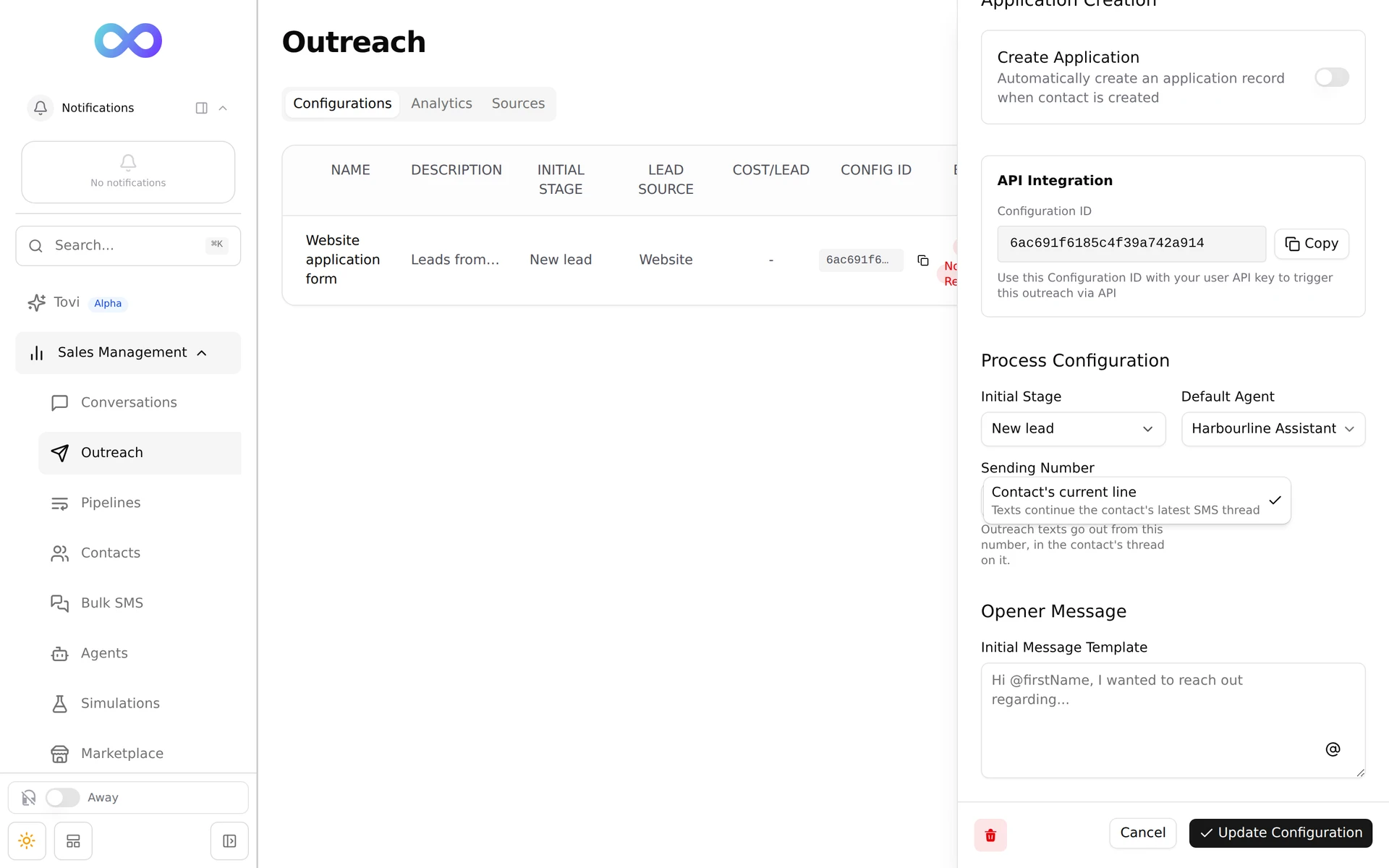
    • NewOutreach configurations have a Sending Number under Process Configuration. Pick one of your texting numbers, or keep Contact's current line to carry on in the contact's latest text conversation, as before.
    • ImprovedWith a number picked, a returning contact's texts go out from that number, not from whichever line they last texted. Tether Relay uses the contact's conversation on that number, or starts one.
    • ImprovedIf the number stops working, for example because it was released, outreach goes back to the contact's current line, so no new leads are missed.
    • The Edit Outreach Configuration panel's Process Configuration with the Sending Number list open on Contact's current line, Texts continue the contact's latest SMS thread
  3. Workflows

    Validation rules can write reminders and call other systems

    A validation rule can now create, edit or delete reminders, remember a key, and check with another system before it lets a change through.

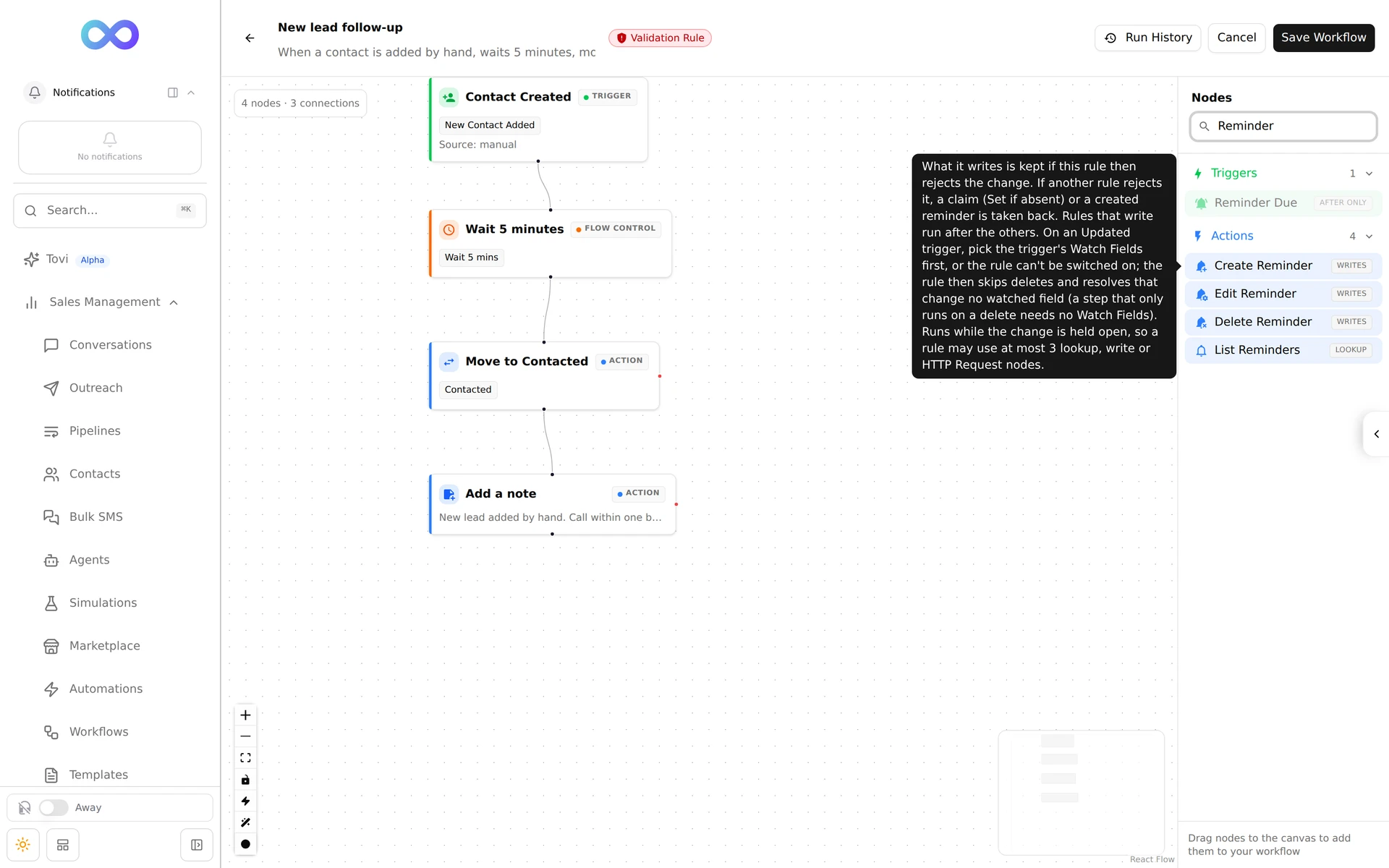
    • NewValidation rules can use Create Reminder, Edit Reminder and Delete Reminder. They show Writes under Nodes.
    • NewPersisted Store can set a key if it isn't there yet, or delete one, inside a validation rule. That makes rules like "the first change per contact each day goes through, the second is blocked" possible.
    • NewValidation rules can use HTTP Request to ask another system before a change is saved, including with a stored secret such as an API key. The rule's history shows the secret's name, never the secret.
    • ImprovedEach save is checked against your validation rules once, so a rule's history no longer shows the same change twice.
    • The workflow editor with the trigger set to Before the change, a Validation Rule badge in the header, and the Nodes list searched for Reminder, showing Create, Edit and Delete Reminder marked Writes and List Reminders marked Lookup
    Read the guideWorkflows
  4. WorkflowsAI agents

    Move an agent's run onto an application from a workflow

    Update Agent State can rebind a contact's agent run to one of their applications, keeping its phase and variables.

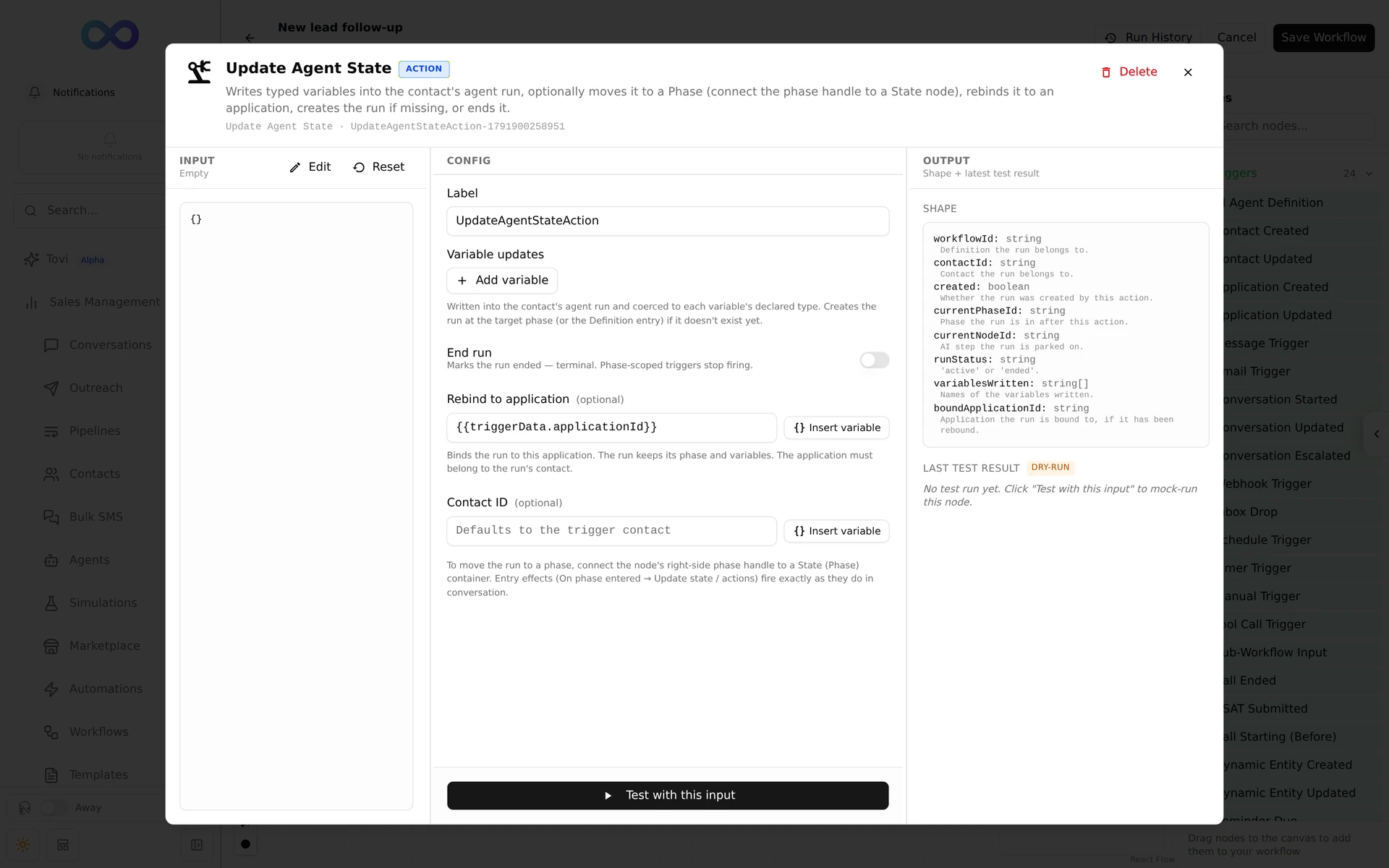
    • NewUpdate Agent State has Rebind to application. The run keeps its phase and variables and from then on uses that application for its prompts, triggers and outbound calls. The application must belong to the run's contact.
    • ImprovedAn agent's Run scope is Contact, Conversation or Application. To start on the contact and move to an application once there is one, rebind the run with Update Agent State.
    • ImprovedAn application-scoped agent picks up a contact's run when that contact has exactly one active application run.
    • FixedA run that has ended no longer stops a new run from starting for the same contact, conversation or application.
    • An Update Agent State node's panel with Rebind to application set to the trigger's application
    Read the guideWorkflows
  5. AI agentsConversations

    Agents remember what they did in a reply that was never sent

    When a customer writes again before the agent's reply goes out, the agent still knows which tools it already used.

    • FixedIf a customer sends another message while the agent is still replying, the first reply is dropped but the tools it used are kept. The agent no longer sends a second verification code or repeats a booking or record update.
    • FixedThe same holds when a teammate takes over the conversation mid-reply, or a reply fails to send.
  6. VoiceConversations

    Call with AI closes right away and tells you how the call went

    Starting an AI call no longer leaves the dialog waiting while the number rings.

    • ImprovedStart AI Call closes the dialog and shows Calling, followed by the contact's name or number, until the call is placed.
    • ImprovedIf the call can't be started, for example because of a validation rule or a do not call setting, the dialog opens again with what you entered so you can fix it and try again.
    • ImprovedIf Tether Relay can't confirm the call started, it says so. Check the contact for a new call before you try again.
    • FixedOutgoing calls that fail straight away, such as a busy line, are recorded as outgoing with the right caller.
    • FixedCalls are filed under the right contact and conversation, even when a call is retried.
    • FixedContacts you've called show up when you filter the conversations list by Voice under Channel, including contacts who first reached you by text or email.
  7. ContactsConversationsPipelines

    Date fields keep their format while you edit them

    A date reads the same when you edit it as when you view it, so you can always tell the day from the month.

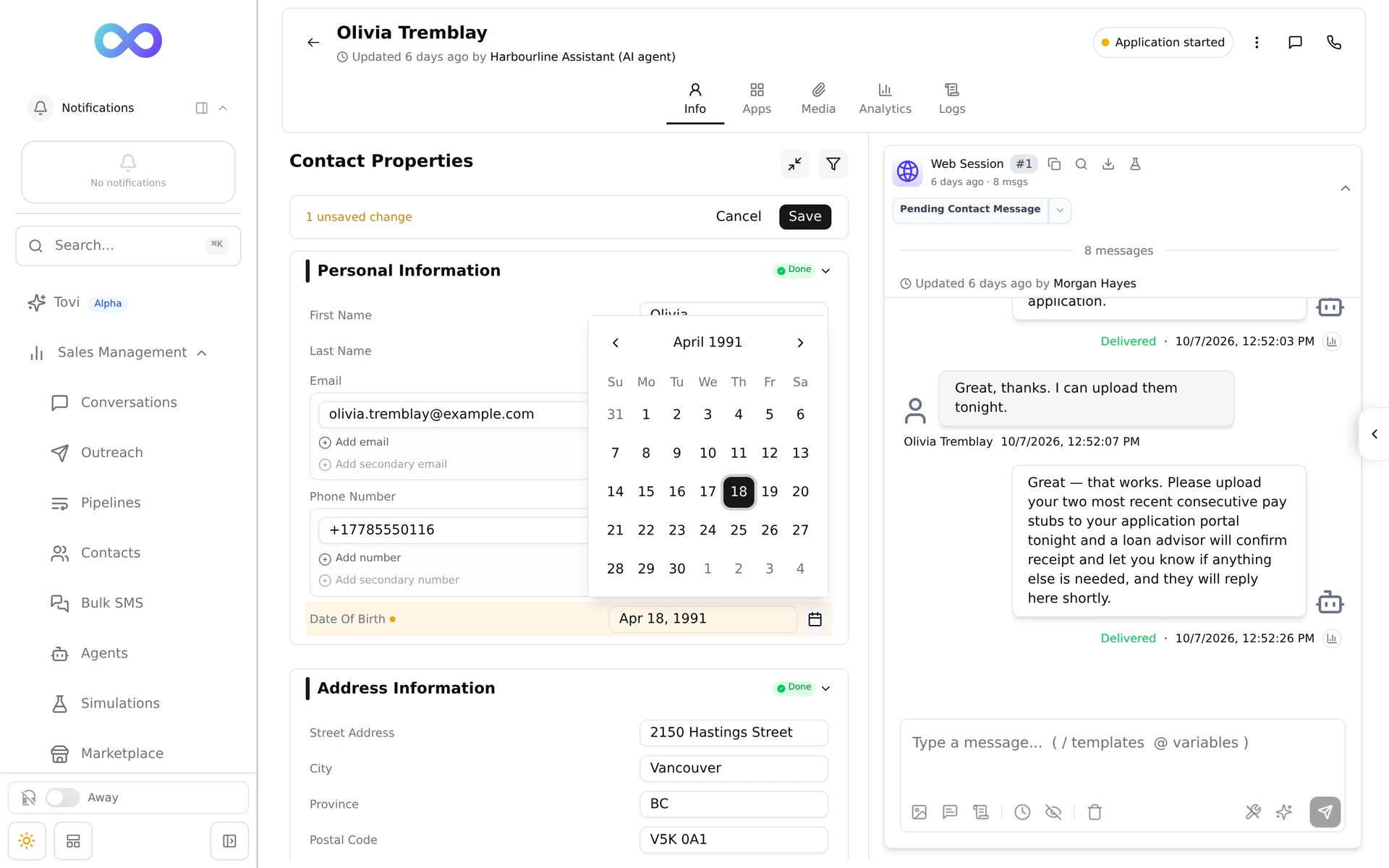
    • ImprovedDate and date and time fields keep the format your Admin set for them while you edit, such as Apr 18, 1991, instead of switching to your browser's format. Type the date that way, or pick it from the calendar beside the field.
    • ImprovedA date that isn't real, isn't in the field's format, or is out of range is outlined in red with a note saying what's wrong, and Save waits until it's fixed.
    • ImprovedA date of birth must be between 1900 and the end of this year, whether you type it or pick it.
    • ImprovedThis applies on contact pages, in the customer profile beside a conversation, and on applications, including Create New Application.
    • A contact's Date Of Birth field reading Apr 18, 1991 while being edited, with its calendar open on April 1991
    Read the guideContact details
  8. AI agents

    Agent variables the agent can read but not change

    Mark an agent variable Read-only for the agent, and only your workflows can set it.

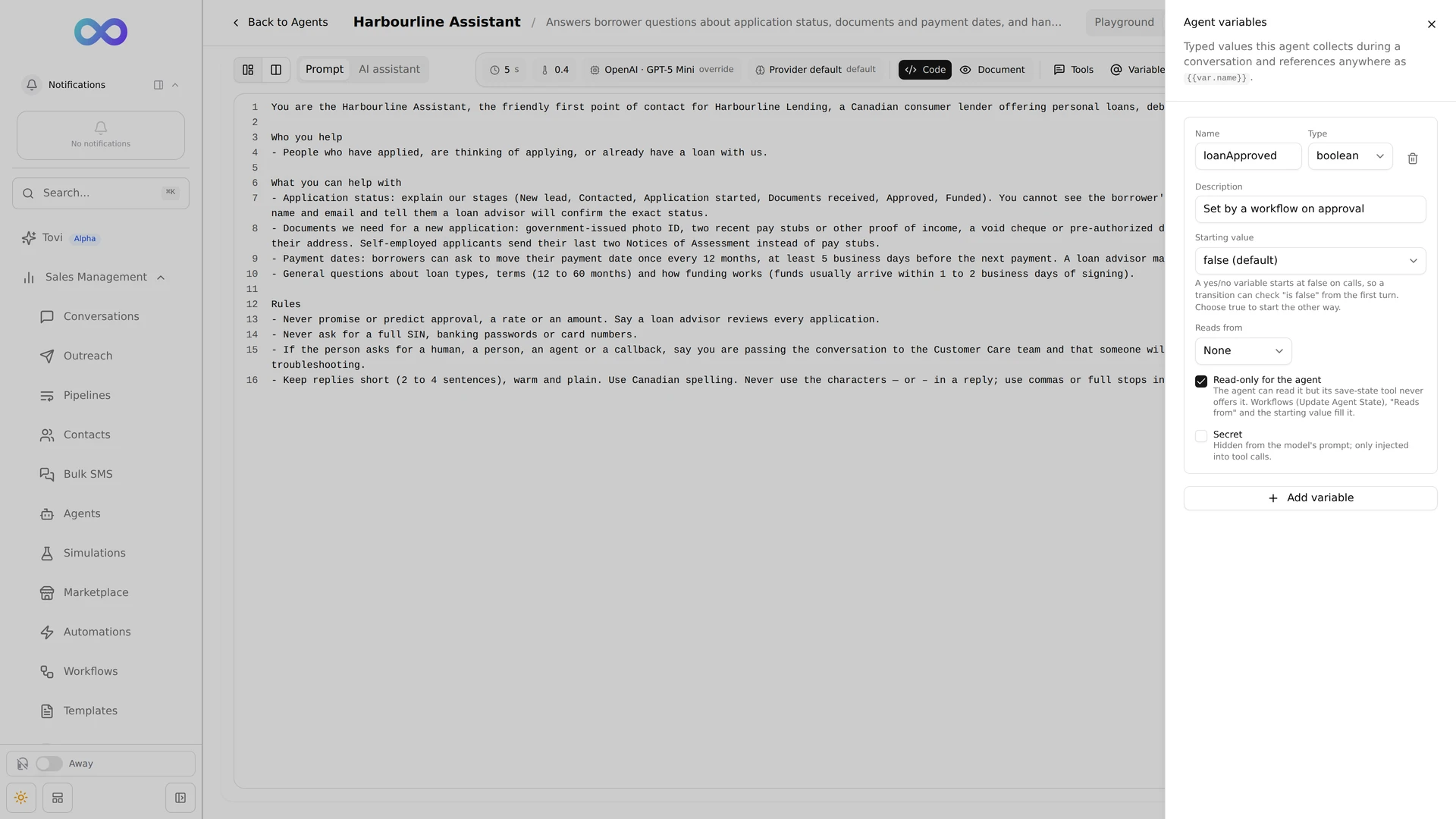
    • NewTick Read-only for the agent on a variable under Manage variables. The agent can use the value but can't change it, so a customer saying "I'm approved" can't move a flow forward.
    • ImprovedRead-only variables are still filled by their starting value, Reads from, and a workflow's Update Agent State step.
    • The Agent variables panel with one variable, loanApproved, of type boolean, with Read-only for the agent ticked
    Read the guideCreate an agent
  9. Contacts

    Duplicate reviews stay up to date

    When a phone number or email changes hands, its duplicate review follows it to the contact that holds it now.

    • FixedA review moves to the contact that now holds the phone number or email, for example after a code verified it or a merge moved it.
    • ImprovedA review that no longer applies is closed and says why, such as a deleted contact or a lost phone number.
    • FixedAfter a merge, the conversations that moved to the remaining contact keep their assignees, phone line and latest message.
    Read the guideDuplicate review
  10. VoiceAI agents

    Voice calls credit the AI agent, and voice tool settings stick

    Calls an AI agent makes or answers, and the notes it writes about them, are recorded under the agent instead of a person.

    • FixedAI calls and their summary notes show the agent's name with (AI) and a bot avatar, never a teammate or You.
    • NewFor a voice agent's built-in tools, such as Skip Turn and End Call, choose Interruptions and Speech before the tool, or keep the voice provider's setting.
    • FixedSaving a voice agent keeps the test values and tool settings set in your voice provider's dashboard.
    • FixedA call that was busy is recorded as busy, and failed calls keep the reason they failed.
    • ImprovedA workflow's Start Call step places the call from one of your organization's AI numbers. Pick one under Call from, or let it use any.
  11. Workflows

    More control in Send Message and record updates

    Choose the AI agent and autopilot for the conversation a message lands in, and decide what happens when a value doesn't fit its field.

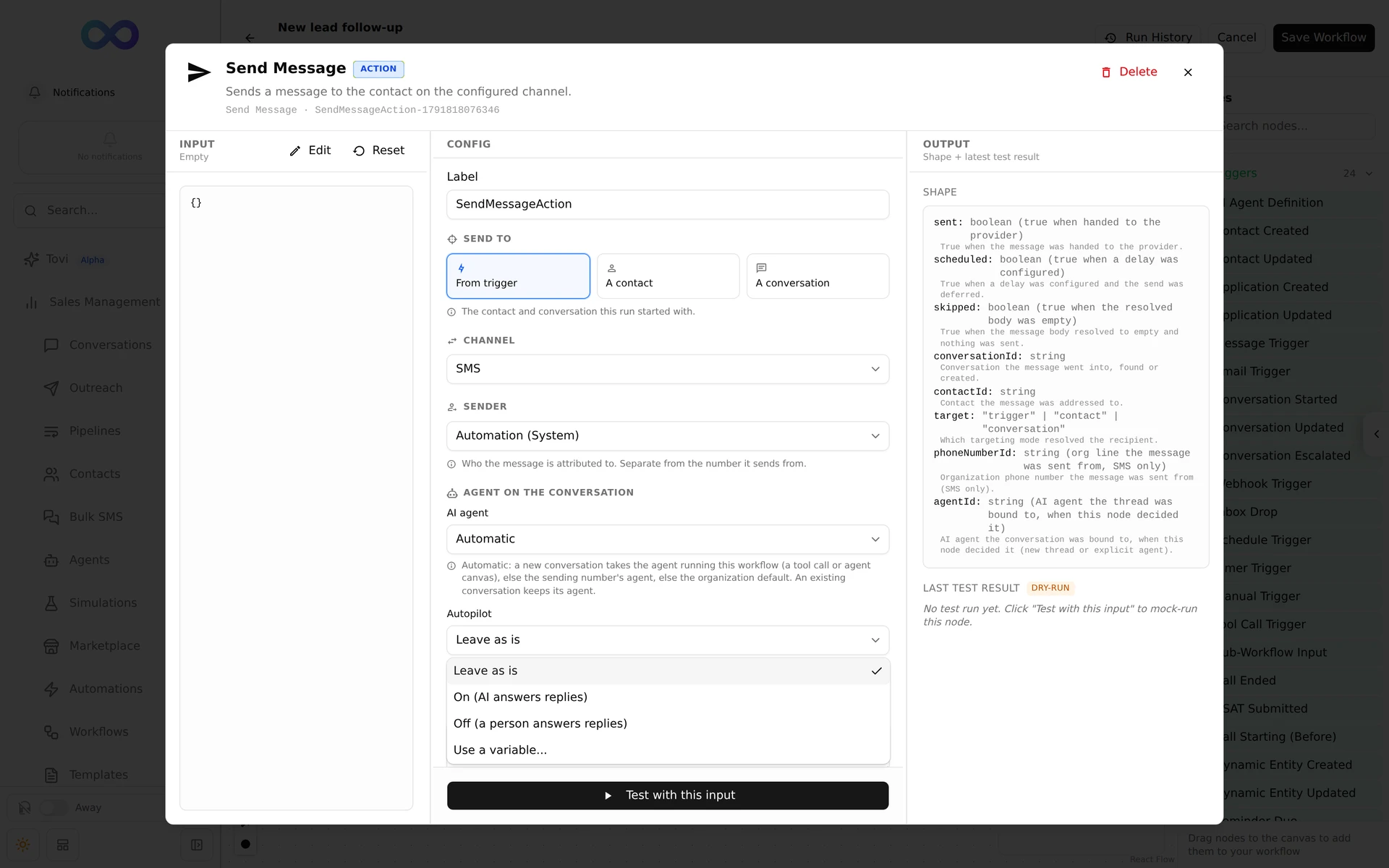
    • NewSend Message has AI agent and Autopilot settings for the conversation it sends into. Automatic uses the agent running the workflow before your default agent.
    • NewChange Process can switch a conversation you choose under Conversation (optional), not only the one the run started with.
    • NewUpdate Contact, Create Application and Update Application have If a value does not match its field. Skip the value, write the rest, or Fail the step.
    • NewValidation rules can use List Reminders, List Media and Persisted Store to look things up before a change is saved.
    • FixedImports, webhooks and workflow steps keep the rows already in a list, and lists longer than 100 rows keep every row.
    • A Send Message node's panel with Agent on the conversation, AI agent set to Automatic, and the Autopilot list open on Leave as is, On (AI answers replies), Off (a person answers replies) and Use a variable
    Read the guideWorkflows
  12. AI agentsConversationsWebchat

    Cleaner AI replies, and fewer chats handed off by mistake

    AI agents no longer pass along their own working notes, and workflow activity no longer looks like the agent repeating itself.

    • FixedNotes the AI keeps about the tools it used never appear in a message to a customer.
    • FixedWhen a customer writes again while the AI is still answering, the older reply is dropped and the AI answers the newest message.
    • FixedWorkflow log rows in a conversation no longer count as AI replies, so ordinary chats are no longer handed to your team as a repeat-reply loop.
    • ImprovedA new visitor's website chat connects without waiting several seconds.
  13. Automations

    Turning off an automation stops it straight away

    When you switch an automation off or archive it, anything it had scheduled for later is cancelled too.

    • FixedTimed actions an automation had already scheduled, such as a message or a resolve, no longer run after it is switched off or archived.
    Read the guideAutomations
  14. Contacts

    Edit a contact's details the same way everywhere

    A contact's page now uses the same Contact Properties panel as the one beside a conversation, so you edit details in one place and save them together.

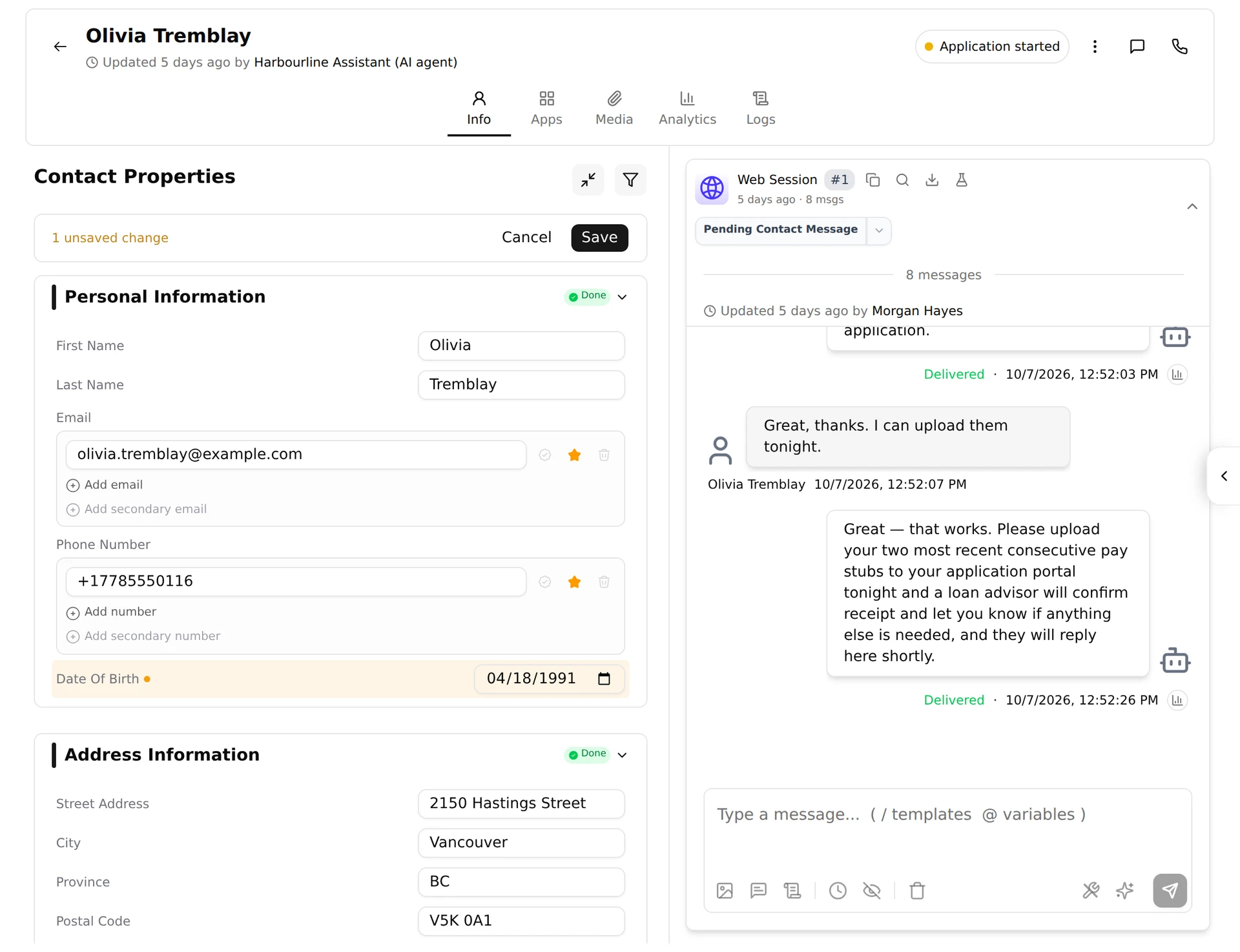
    • ImprovedOn a contact's Info tab, select Edit on Contact Properties, change any fields, then select Save once. Saved 1 field confirms it.
    • ImprovedIf the change could make the contact a duplicate of another, you are told the pair went to duplicate review.
    • ImprovedEdit is no longer in the contact's ... menu, and the header no longer has its own Save Changes and Cancel.
    • ImprovedField and section names are written the same way across contacts, conversations, pipelines and automations.
    • Olivia Tremblay's contact page with Contact Properties open for editing, a date of birth typed in, and 1 unsaved change with Cancel and Save above the fields
    Read the guideContact details
  15. ContactsWorkflows

    Rows in a list keep their place

    Editing or removing a row in a list, such as a contact's income sources or an application's products, changes only that row.

    • FixedEditing a row no longer marks the old version of it as removed.
    • FixedWhen the AI reads a message about a row you removed, it no longer writes those details onto another row. If it can't tell which row a detail belongs to, it writes nothing and tells you.
    • FixedRemoved rows no longer count toward an application's status or Derive Field results.
  16. Platform

    No more surprise session timeouts while you work

    Session Timed Out only opens when your session has really ended, and you can close it to save your work first.

    • FixedSession Timed Out no longer opens while you are active on the page.
    • ImprovedClose the session window with the X to save what you are working on, then sign in again. It stays open when your organization requires you to sign out.
    • FixedSeveral open tabs renew your session together instead of signing each other out.
    • ImprovedIf a page fails to load, Something went wrong offers Try again instead of a blank screen.
    Read the guideSign in
  17. Conversations

    Unread conversations stand out in the list

    A conversation with messages you haven't opened is tinted violet with a bar down its left edge, so it's easy to spot.

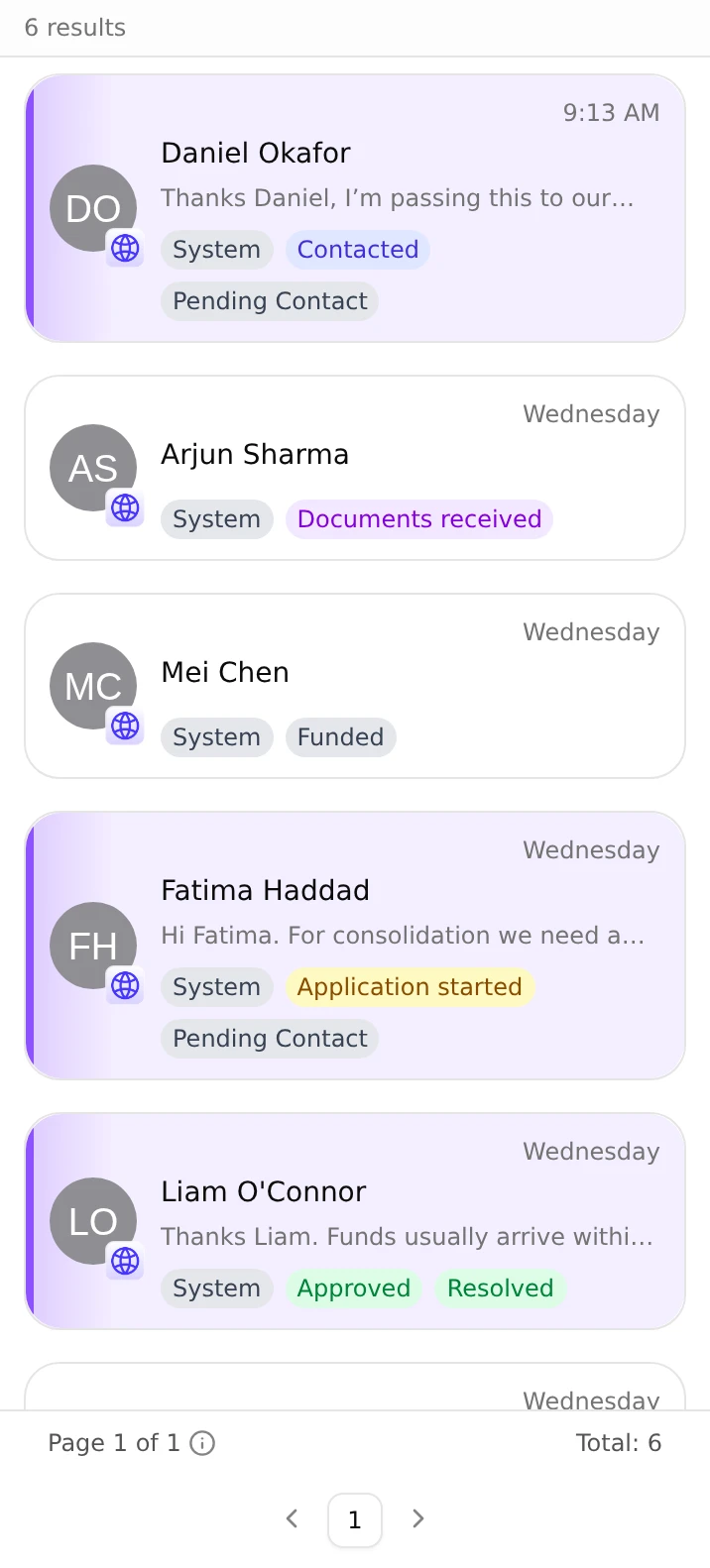
    • ImprovedUnread cards are tinted violet with a violet left edge, and keep that look while you have them selected.
    • ImprovedThe unread message count is purple, and the green New chip is gone.
    • FixedDetails the AI pulled out of a conversation as a list show as readable text instead of [object Object].
    • The conversations list with Daniel Okafor's card tinted violet with a violet left edge, above read cards for Arjun Sharma, Mei Chen and others
    Read the guideThe inbox
  18. Workflows

    Describe a workflow, and get back unsaved changes

    Give a workflow a description right in the editor, and pick up where you left off if the page reloads before you save.

    • NewAdd a description under the workflow's name in the editor. It shows under the name on Workflows, and a long one shows in full when you hover over it.
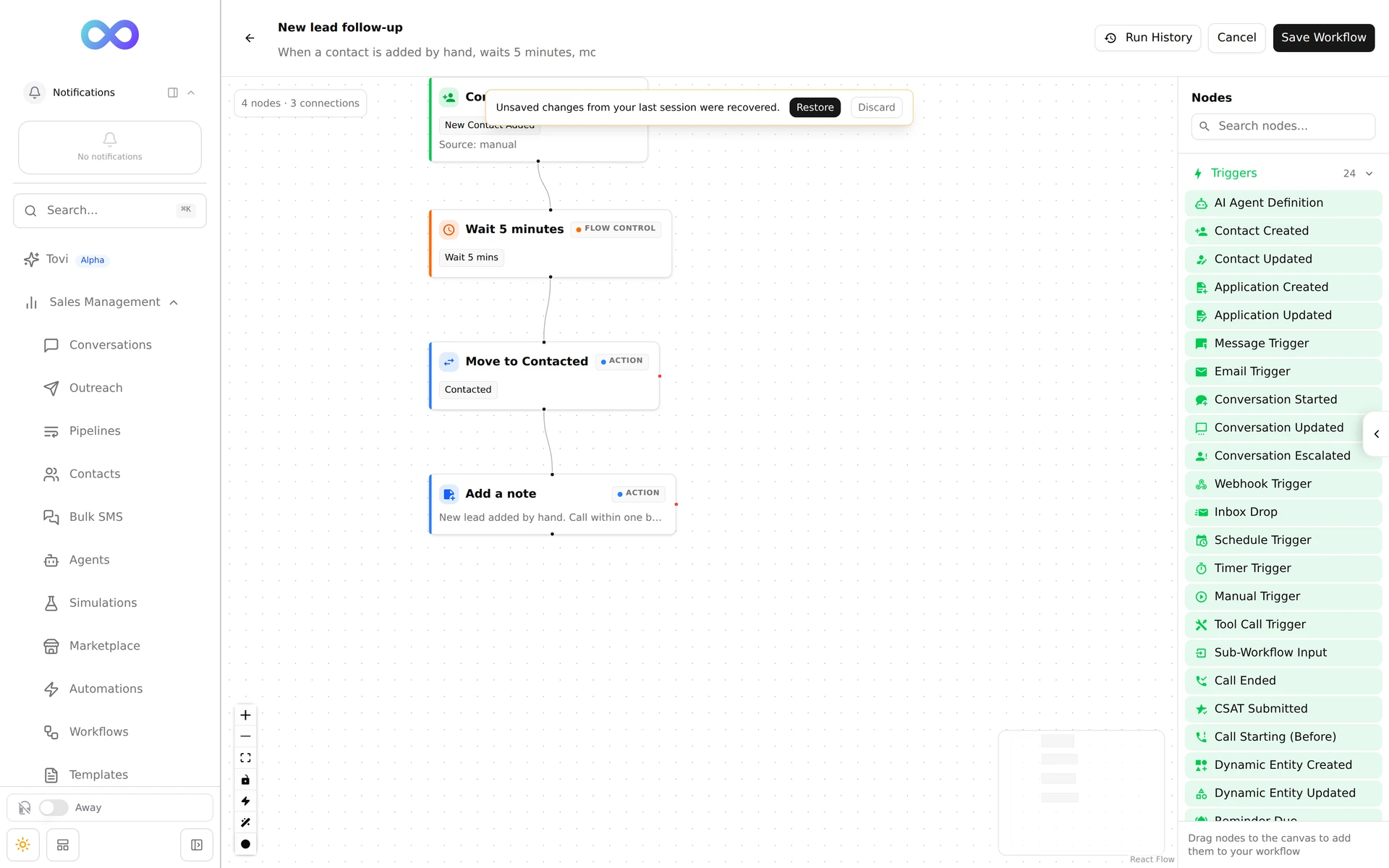
    • NewThe editor keeps a draft of unsaved changes in your browser. Open the workflow again and choose Restore or Discard.
    • ImprovedFields saved by an HTTP Request step appear when you insert a variable in later steps.
    • FixedWarnings about invalid placeholders no longer flag valid HTTP Request bodies.
    • NewUpdate Contact can take over a phone number or email from another contact once it has been verified, for example with a code.
    • The editor for New lead follow-up with a banner over the canvas saying Unsaved changes from your last session were recovered, with Restore and Discard
    Read the guideWorkflows
  19. ConversationsSettings

    Share a phone line with your team

    A phone number can be shared with several people, departments or groups, who see and answer its conversations.

    • NewConversations on a line shared with you appear in your list, including ones with no assignee.
    • NewSend from any line shared with you. Lines that are not your own are tagged Shared, Team line or Org default.
    • ImprovedEveryone who can read a shared line is notified about new messages on it.
    • ImprovedIf you have no number of your own, your texts go out from your organization's default number.
    Read the guideThe inbox
  20. Workflows

    Older workflows save again, and step tests work

    Saving a workflow now checks only the steps you changed, and testing a step works the way a real run does.

    • FixedOlder workflows with leftover settings can be saved, turned on and edited by Tovi again.
    • ImprovedEditing an older step tidies away settings it no longer uses, and errors name the step by its label.
    • FixedTest with this input runs again, can use earlier steps' outputs, and flags missing vault secrets.
    • FixedPlaceholder warnings match the way the workflow reads placeholders.
    • FixedTesting a Return step fails for results a real tool call would reject.
  21. AI agents

    Choose the model for each agent

    Set an agent's AI model and reasoning effort, or let it follow your organization's default.

    • NewPick a model for one agent from the model chip in the agent editor, or keep the organization default.
    • NewSet the reasoning effort for models that support it.
    • ImprovedThe model picker shows each model's pricing.
    • ImprovedModel and reasoning effort are saved with the prompt version.
    • ImprovedBefore you archive an agent, the reassign dialog lists the phone numbers that use it and whether it is the organization's default agent.
  22. Conversations

    A check before you reply in an autopilot conversation

    When you send a message in a conversation the AI is handling, Tether Relay asks whether autopilot should stay on.

    • NewChoose Send and turn off autopilot, Send and leave autopilot on, or Don't send. Don't send keeps your draft and attachments.
    • ImprovedIf the AI was already writing a reply when you sent yours, its reply is not sent.
    • ImprovedThe autopilot switch stays in sync everywhere the conversation is open.
    Read the guideThe inbox
  23. Workflows

    Code steps and the current time in workflows

    Run a short JavaScript snippet in a workflow, and give AI steps the current date and time.

    • NewThe Code step runs a JavaScript snippet on the workflow's data and passes on what it returns. Snippets can't reach the network or your secrets.
    • NewAI Extract, AI Generate and AI Classify can read Current Date and Time as context, in your organization's timezone or one you choose.
  24. ConversationsContacts

    Smoother conversations and record edits

    Fixes for new text threads, saving records, and values the AI pulls out of conversations.

    • FixedStarting a text to a contact with no conversation no longer flickers or shows an error.
    • FixedAn open conversation no longer redraws when messages or calls arrive in other conversations.
    • NewThe conversation shows when a value the AI pulled out of it could not be saved, and why.
    • FixedValues the AI pulls into list fields update the matching row instead of adding a duplicate.
    • FixedAn old invalid value on a record no longer stops you from saving other changes.
    • ImprovedA failed save tells you the reason.
  25. AI agentsWorkflows

    Decide what happens when an agent repeats a tool call

    For each tool, choose whether a repeat call runs again, gives back the earlier result, or is refused.

    • NewUnder Duplicate calls on an agent's tool, choose Refuse it, Give back the earlier result, Skip it and say it was not run, or Run it again.
    • NewChoose what counts as the same call and how long calls are remembered.
    • NewWorkflow tools take the same settings on their Tool Call trigger.
    • NewRemember completed calls lets the agent see on later replies that a tool already ran.
    • NewThe Return step sets how much of a workflow tool's result the agent sees on later replies.
  26. PlatformPipelines

    Find applications from search

    Cmd+K search now finds applications as well as contacts.

    • NewApplication results show the contact, the pipeline stage and recent activity, and open the application.
    • NewContact results list the contact's applications, which you can expand.
    • ImprovedSearch only shows the applications and contacts you have access to.
  27. ContactsPipelinesConversations

    Edit a contact or application in one go

    Change as many fields as you need on a contact or application, then save them together.

    • NewClick Edit on the properties panel, change any fields, then Save once, or Cancel to discard everything.
    • NewChange an application's owners and assignees in the same panel as its other details.
    • ImprovedIf a save fails, your changes stay in place and you see what went wrong.
    • ImprovedYou're asked before leaving or switching to another contact or conversation with unsaved changes.
    • ImprovedInvalid or repeated emails and phone numbers are flagged before you save.
    Read the guideContacts
  28. Platform

    Sign-outs follow inactivity

    Your session times out after a stretch of inactivity, not a fixed time after you signed in.

    • ImprovedThe idle timeout counts from the last time you were active.
    • NewA Session Expiring Soon warning appears before you are signed out.
    • FixedSigning in again with single sign-on after a timeout no longer loops, and brings you back to the page you were on.
    Read the guideSign in
  29. SettingsAI agents

    See what your AI costs

    The AI Consumption dashboard shows AI usage and cost across your organization. Admins can use it.

    • NewOpen AI Consumption under Organization Management.
    • NewSee usage and cost by agent, workflow, simulation, Tovi, automation and voice call.
    • NewFilter and sort the record of AI calls, and follow a link to where each one came from.
  30. AI agentsConversations

    A person takes over when an agent can't reply

    When an agent fails to write a reply, the conversation goes to a teammate who is online.

    • ImprovedThe conversation is assigned to someone who is online, who gets a notification and sees it on the Escalation Dashboard.
    • ImprovedIf nobody is available, the conversation waits in the queue until someone is.
    • NewChoose who receives these conversations in the agent editor under AI failure handoff.
  31. SettingsWorkflows

    Connect workflows to APIs that need a sign-in

    Admins can save Auth Connections that let HTTP Request steps sign in to partner APIs.

    • NewAdmins add a connection in Organization Configuration under Auth Connections, with its token URL, client id, client secret, scopes and allowed hosts.
    • NewChoose DPoP or Bearer as the connection's authorization scheme.
    • NewPick the connection under Authentication on an HTTP Request step.
  32. Workflows

    Start a workflow when a field changes

    The Record Field Changed trigger starts a workflow when a field you choose changes on a contact, conversation or application.

    • NewPick the record type and the fields to watch.
    • NewWatch fields inside custom records, too.
    Read the guideWorkflows
  33. ConversationsContactsAI agentsAutomations

    Records belong to your organization

    Contacts, conversations, workflows and automations belong to your organization, and people work on them through assignment.

    • ImprovedRemoving a user deactivates them, and their conversations, workflows and automations keep working.
    • NewA conversation can have no assignee, and admins find these with the Unassigned filter.
    • NewEach agent has its own persona, the name, position and business details it uses with customers.
    • NewAdmins choose a Default Agent that answers new conversations on channels with no agent of their own.
    • ImprovedAutomations run for the whole organization, with no per-user switch.
    • NewThe Logs tab on a record shows who created it and who changed each field.
  34. AI agentsWorkflows

    Richer agent simulations

    A simulation can have an AI play the customer, start partway into a conversation, and run several times for a score.

    • NewAn AI customer, with its own instructions, opening message and turn limit, plays the other side of a text conversation.
    • NewStart a case from earlier conversation history to test a moment in the middle of a conversation.
    • NewRun a case or a whole suite several times and get a score for the agent.
    • NewAfter you change a prompt, the suite offers to run again.
    • NewGive a workflow tool a mock response, as text, JSON or an error, so a simulation doesn't call real systems.
    • NewVoice simulations include workflow tools.
    • ImprovedThe test modes are now called Dry run, Sandbox and Live.
    • NewStop a run that is in progress.
    Read the guideSimulations
  35. WorkflowsVoice

    Start Call outcomes and smarter validation rules

    Start Call tells the workflow whether the call was placed, and validation rules can check other records before allowing a change.

    • NewStart Call has separate success and failed exits. A call that was never placed counts as failed.
    • ImprovedExisting workflows that use Start Call keep working.
    • NewValidation rules can look up other records, for example to block a new application when the contact recently had one of the same type.
    • NewValidation rules can reject a change with your own message.
  36. Webchat

    More dependable webchat

    The webchat widget shows a customer's message as sent only once Tether Relay has saved it, and resolved chats stay closed.

    • FixedCustomer messages no longer go missing when the connection drops while they are sending.
    • ImprovedA resolved chat stays closed. The customer sees Start New Chat instead of typing into the old one.
  37. Contacts

    Add a contact whose phone or email is already taken

    Creating a contact with a phone number or email that belongs to another contact now succeeds and sends the pair to duplicate review.

    • ImprovedThe contact is created, and a warning names the contact that already has the phone number or email.
    • ImprovedThe shared value is kept on the new contact as a secondary value, and you can't message the contact on it until the review is done.
    • NewThe two contacts go to Review Duplicate Contacts, where they can be merged or kept apart.
    • ImprovedIf your organization merges matching contacts automatically, you are told which existing contact the new one was merged into.
    Read the guideContacts
  38. ContactsConversationsPipelines

    Reminders on the records they are about

    Contacts, applications and conversations each have a Reminders card where you see and set reminders.

    • NewSet a reminder from the Reminders card on a contact, an application or a conversation.
    • NewA contact's card also lists the reminders on its applications and conversations, labelled with the record each one belongs to.
    • NewEdit your own reminders in place until they go off.
    • NewShow fired brings back reminders that have already gone off.
  39. WorkflowsPipelines

    New workflow building blocks

    Wait in business days, split traffic for tests, run several tools from one workflow, and start workflows from applications.

    • NewWait can count business days, skipping weekends and the holidays and closures in your business hours.
    • NewConditions can compare the last digits of a number, which splits traffic evenly for A/B tests.
    • NewConditions can check whether a value is in a list.
    • NewOne workflow can hold several Tool Call triggers.
    • ImprovedThe variable picker shows what each earlier step really outputs, and flags fields that don't exist.
    • ImprovedEdit dropdown options as chips and drag them into order.
    • NewRun a workflow from an application card or the pipeline board.
    Read the guideWorkflows
  40. SettingsContacts

    Computed numbers that round properly

    Computed number fields round correctly, show the decimal places you set, and update on screen as soon as they change.

    • NewUse ROUND, FLOOR, CEILING and ABS in computed field formulas.
    • NewSet how many decimal places each number field shows.
    • FixedComputed fields that depend on other computed fields calculate in the right order, so totals reflect the latest save.
    • FixedAn open record shows a recalculated value without a page refresh.
    • FixedThe application editor in the conversation sidebar shows nested sections with their values.
  41. PipelinesContactsVoice

    Pipeline boards for applications

    Applications get pipeline boards of their own, and pipeline cards show the fields you choose.

    • NewApplications can follow their own pipelines, separate from your contact pipelines.
    • NewChange an application's stage from the stage dropdown on its card.
    • ImprovedIf someone else changes an application while you are editing it, you are told instead of overwriting their change.
    • ImprovedPipeline cards show the fields you pick in Manage Fields.
    • ImprovedContact details make better use of the screen.
    • ImprovedCall recordings have play, seek, skip back and volume controls.
    Read the guidePipelines
  42. Tovi

    Tovi stays with you as you work

    Tovi keeps working while you move around the app, and it can sit beside the page instead of over it.

    • NewClick a step in a workflow Tovi shows you to see its full settings without leaving the chat.
    • NewLinks in Tovi's answers open the page with Tovi still open.
    • NewDocked mode moves the page aside to make room for Tovi.
    • ImprovedTovi keeps working when you change pages, close the panel or reload, and the panel tells you it is still working.
    Read the guideTovi
  43. AI agentsTovi

    Edit agent prompts with Tovi in the Playground

    Each agent has its own Tovi thread in the Playground for asking about its prompt and changing it.

    • NewUse Ask to question Tovi about the prompt, and Edit to have Tovi change it.
    • NewTovi's changes show as a diff, and you accept or reject each part.
    • ImprovedTovi replaces the separate prompt assistant.
  44. PipelinesContacts

    Assign several people to an application

    An application can have more than one assignee, such as one person who opens it and another who closes it.

    • NewAdd or remove assignees from the application card, the application's details or a workflow.
    • NewAssignees show as avatars on the application card.
    • NewPeople you add as assignees get a notification.
    Read the guidePipelines
  45. Workflows

    More control over workflow messages

    Send Message can target a specific contact or conversation and choose the number it sends from.

    • NewPoint Send Message at a specific contact or conversation.
    • NewChoose which phone number Send Message sends from.
    • ImprovedCall Ended workflows can use every detail of the call.
    • ImprovedA reminder a workflow creates notifies the person it is assigned to, not the person who built the workflow.
    • NewUI Widget steps have a Cancel button, so a rep can close a widget without answering it.
    • FixedWebhook triggers keep their response setting after you save the workflow.
  46. Workflows

    Work out a field from related records with Derive Field

    The Derive Field step sets a value from a record's children, such as an application's status from the status of its products.

    • NewAdd Derive Field from the node palette and write rules that decide the value from the child records.
    • NewRules are checked in order, and the first one that matches sets the value.
  47. Tovi

    Meet Tovi, the assistant built into Tether Relay

    Ask Tovi in plain English to look things up or make changes across Tether Relay. Tovi is in alpha.

    • NewOpen Tovi from the sidebar or with Cmd+Shift+Space (Ctrl+Shift+Space on Windows).
    • NewTovi can read and update conversations, contacts, agents, workflows, automations, pipelines and applications.
    • NewAnswers can come back as working views, such as a workflow canvas, a pipeline board, a contact card or a chart.
    • NewPlan and Ask modes only read. In Normal mode, Tovi asks you to confirm each change before it makes it.
    • NewEvery role can use Tovi. Sales reps can read their conversations and contacts, and admins set what each department can read and change under Tovi Access.
    • NewTovi keeps a private memory for you that you can review and edit in its settings.
    • NewBulk contact actions and exports that Tovi starts run in the background.
    Read the guideTovi
  48. AI agents

    Test an agent's whole flow in the Playground

    The Playground and simulations run the flow linked to an agent, not only its prompt.

    • ImprovedAn agent built as a flow answers in the Playground the way it answers customers.
    • ImprovedSimulations of a flow-based agent run its phases and tools.
    Read the guideSimulations
  49. Conversations

    Tidier results in the conversation timeline

    Workflow, data extraction and automation results show as compact rows in a conversation.

    • ImprovedEach result takes one small row. Click it to open the details.
    • ImprovedDetails read as labelled fields instead of raw data.
    Read the guideThe inbox
  50. WorkflowsAI agents

    A clearer workflow editor

    Workflow steps are easier to read, and new controls help you find your way around large flows.

    • ImprovedEvery step uses the same layout, and its color shows what kind of step it is.
    • NewCollapse a phase to hide the steps inside it.
    • NewFocus mode dims everything outside the path you selected.
    • NewAuto-arrange lays out the whole flow in one click.
    • NewMove between steps with the keyboard, and zoom out further to see a large flow at once.
    • NewSearch the Workflows and Agents lists.
    Read the guideWorkflows
  51. Platform

    One search for your whole workspace

    Press Cmd+K (Ctrl+K on Windows) to search contacts, agents, workflows and more from one box.

    • ImprovedOne search covers contacts, agents, workflows and the pages of the app.
    • ImprovedResults are grouped by type, with the closest matches first.
  52. VoiceAI agents

    Set up voice agents in Tether Relay

    Voice agents are created and edited in Tether Relay, and you choose which agent places each AI call.

    • NewCreate and edit voice agents in Tether Relay. Saving an agent updates the agent that takes your calls.
    • ImprovedA voice agent follows its flow during the call, the same way a text agent does.
    • ImprovedCall with AI asks you to pick the agent that places the call.
  53. ContactsCampaigns

    Text every contact that matches your filters

    A bulk text from Contacts now reaches every contact that matches your filters, not only the ones loaded on screen.

    • NewSelect all contacts that match your filters and send them one text, however many pages they span.
    • ImprovedLarge sends run in the background, and a progress bar shows how far along they are.
    Read the guideContacts
  54. Workflows

    Show a rep a form from a workflow

    The new UI Widget step puts a small form in front of a rep and continues the workflow based on the button they press.

    • NewAdd a UI Widget step to a manual workflow and build its form from text, cards, dropdowns, tables and buttons.
    • NewThe widget appears on the contact, conversation or application the workflow runs on.
    • NewEach button has its own exit, so the workflow branches on the rep's choice.